



Integrations
Connect AWS, Google Cloud, GitHub, and KiteCyber to sync inventory, findings, and Security 360 signals into Atlas.
Overview
Integrations is where admins connect external sources. Atlas pulls read-only inventory and security signals, normalizes them into Inventory, Vulnerabilities, Risks, AI Governance, and Security 360 - without storing source code or prompt content.
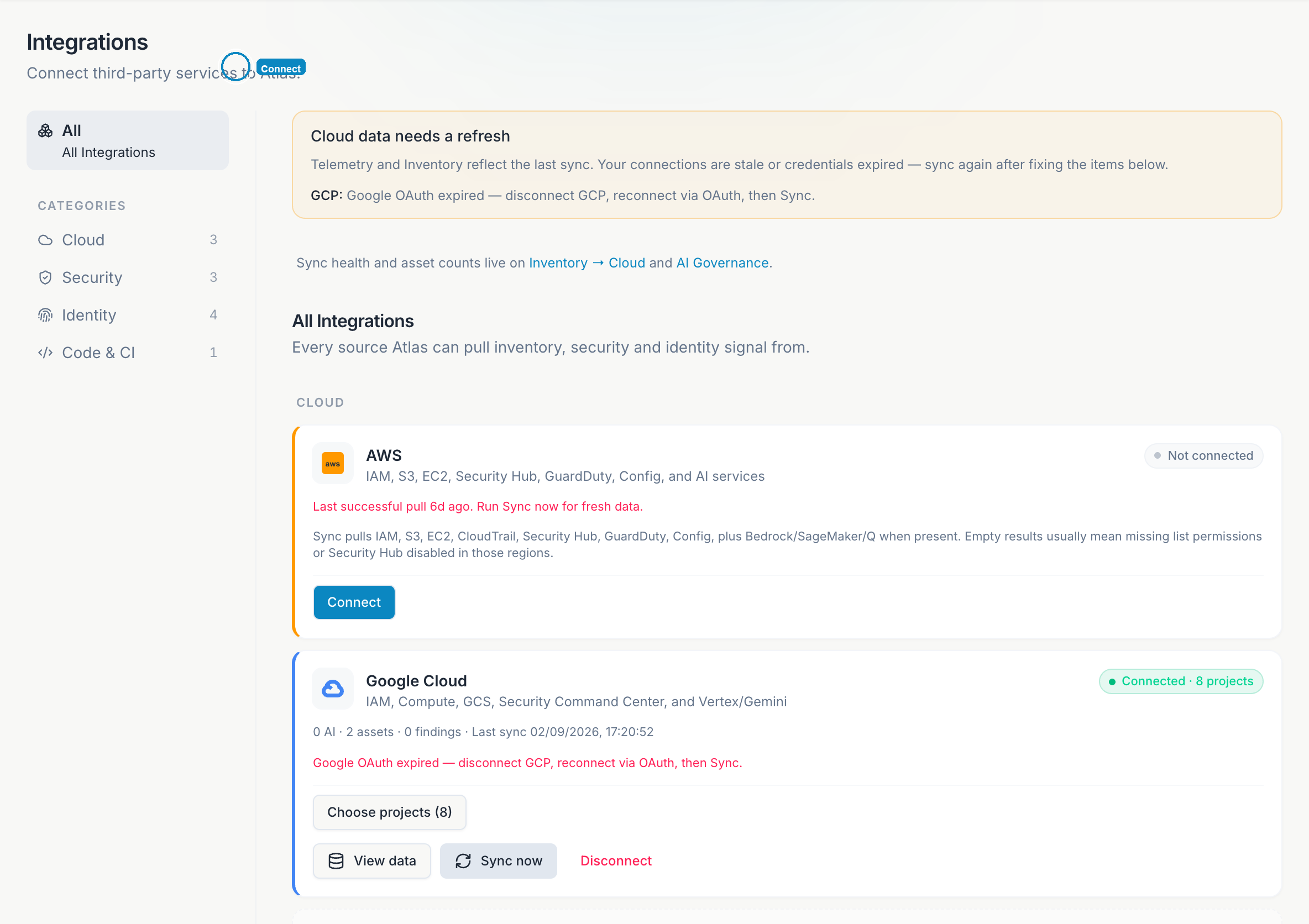
Only admins can connect, disconnect, or sync. Everyone in the org can see connection status.
Available connectors
Amazon Web Services
IAM, S3, EC2, Security Hub, GuardDuty, Config, and AI services (Bedrock/SageMaker). Feeds Inventory, Security 360, Vulnerabilities, Risks, and AI Governance.
Google Cloud
IAM, Compute, GCS, Security Command Center, and Vertex/Gemini. Same Atlas surfaces as AWS.
GitHub
Org policies, Copilot seats, secret scanning, branch protection, MFA gaps. Feeds AI Governance, Security 360, and Vulnerabilities.
KiteCyber
Endpoints, installed apps, SaaS usage, GenAI apps, and CVEs. Feeds Inventory and Vulnerabilities.
Additional connectors (Okta, Google Workspace, Microsoft Entra, CrowdStrike, Netskope) appear in the catalog as Coming soon.
Connect AWS
Open Integrations
Sidebar → Integrations. Find the AWS card and click Connect.
Run the CloudShell script
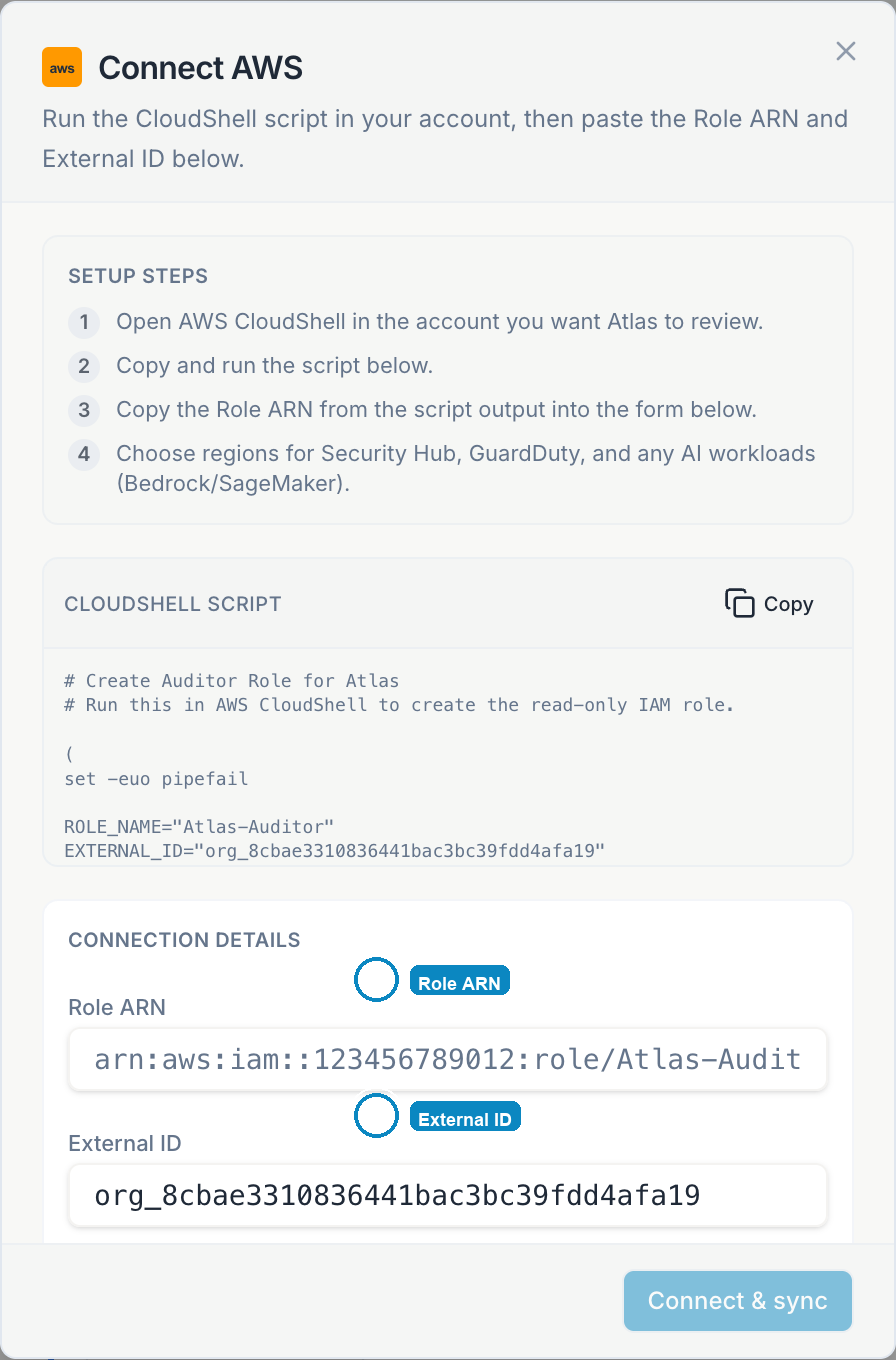
In the connect dialog, copy the setup script. Open AWS CloudShell in the account Atlas should review and run it. The script creates a read-only IAM role with an external ID.
Paste connection details
Copy the Role ARN and External ID from the script output. Choose comma-separated regions (for example us-east-1,ap-southeast-1).
Connect & sync
Click Connect & sync. Atlas validates the role and runs the first sync.
What AWS sync writes
| Atlas surface | Content |
|---|---|
| Inventory → Cloud | Accounts, buckets, compute, IAM summaries |
| Inventory → Identities | IAM users and roles |
| Security 360 | Misconfigurations, identity risks |
| Vulnerabilities | HIGH/CRITICAL findings from Security Hub and GuardDuty |
| AI Governance | Bedrock and SageMaker systems |
| Framework evidence | Dated snapshots on mapped ISO 42001 / SOC 2 / ISO 27001 controls |
If sync fails with a credentials error, click Sync now again. For persistent failures, disconnect and re-run the CloudShell script with a fresh external ID.
Connect Google Cloud
Open Integrations
Find the Google Cloud card and click Connect.
Authorize OAuth
Sign in with a Google account that can list projects and read Security Command Center in your org.
Choose projects
Select which GCP projects Atlas should scan. You can change this later with Choose projects.
Sync
Click Sync now. Findings and inventory appear after the first successful run.
If you see Google OAuth expired, disconnect GCP, reconnect via OAuth, then Sync now. OAuth tokens expire periodically and must be refreshed.
Connect GitHub
Install the GitHub App
From the GitHub card, start the install flow. Choose the organization Atlas should monitor.
Grant read permissions
Atlas needs read access to org metadata, members, secret scanning, and Copilot billing - not repository source code.
Sync
After install, click Sync now. Copilot seats, secret alerts, and policy gaps populate Security 360 and AI Governance.
Self-hosted deployments: configure GITHUB_APP_* environment variables per your operator guide before connecting.
Connect KiteCyber
Get Partner API credentials
Obtain Client ID and Client Secret from KiteCyber Partner API access.
Connect
Paste credentials in the KiteCyber card and click Connect. Secrets are stored encrypted and never shown in full after save.
Sync now
Each sync replaces previous KiteCyber rows. Manual (non-KiteCyber) inventory entries are kept.
What KiteCyber sync writes
| Atlas page | From KiteCyber |
|---|---|
| Inventory → Endpoints | Devices - hostname, OS, serial, owner, compliance flags |
| Inventory → Software | Installed apps, sanctioned/shadow SaaS, GenAI apps |
| Vulnerabilities | Compliance gaps, app CVEs, policy enforcement issues |
| AI Governance | Endpoint-discovered GenAI and shadow AI tools |
Sync behavior
- Manual sync - Admins click Sync now on any connected card.
- Scheduled sync - Hosted Atlas runs periodic syncs automatically.
- View data - Inspect the raw normalized payload Atlas stored from the last sync (useful for debugging).
- Disconnect - Removes the connector config. Existing rows from that source are marked stale; they do not delete manual entries.
Sign-in uses your identity provider (Auth0, Keycloak, Okta, Azure AD, Google Workspace, or any OIDC IdP) - configured at deployment, not on this page.
File attachments (evidence, vendor docs, BCP plans) use your deployment's object storage (S3, GCS, or MinIO), separate from integration sync.